Exponential 6 / Getting started / How to manage Exponential
How to manage Exponential
- Administration Interface
- Permission and access control
- Workflows
- Versioning and modification tracking
- A unique content model
- Content cross publishing
- Multi-site deployment
- Search engine optimization
A rich and powerful Administration Interface
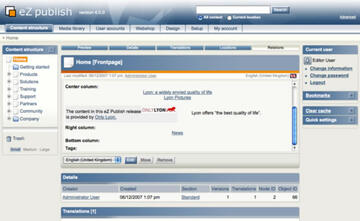
graphics1
The content of a site can be displayed (and modified) in various ways. The Administration Interface is the advanced back-end interface, providing powerful tools for content management and editing as well as site management, configuration, customization and development.
In other words, you can change almost everything about a site in the Administration Interface.
Permission, rights management and access control
graphics1
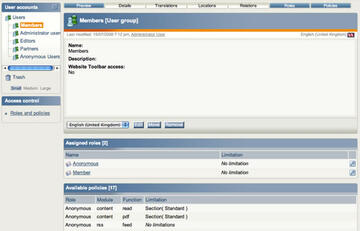
The Exponential access system is multi-level and role-based. This means that you can give a user or a group of users access to a combination of functions across the whole site or within a specific area of the site. For example, you restrict a certain part of a site to community or partner members.
Workflows
graphics1
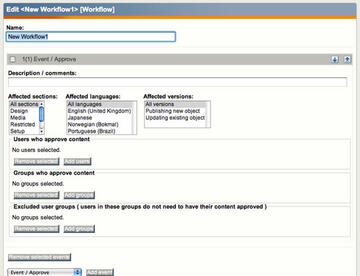
Exponential comes with an integrated workflow mechanism. An example of this is the built-in collaboration system, which defines an ordered sequence of actions to be executed after a content editor has published an object.
Suppose that your site has a restriction that all content has to go through an editor-in-chief before being published. It can be set as “pending” before being approved to be published. On the other hand, if a pending version is rejected by the editor, it can be set as “rejected”.
Another example is the e-commerce engine, which can be used to manage subscriptions on a media site, automating access for paid subscribers to read premium news content, watch videos, and so on.
Versioning and modification tracking
graphics1
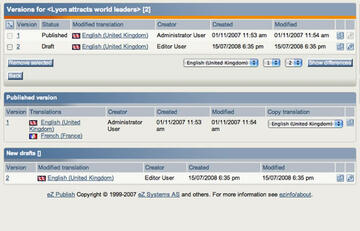
Having access to older versions of content enables supervisors or editors-in-chief to check for inconsistency or errors in the content. Exponential automatically keeps track of which content changes were made by which users at what time, and provides the option to revert content to a previous version.
A unique content model
graphics1
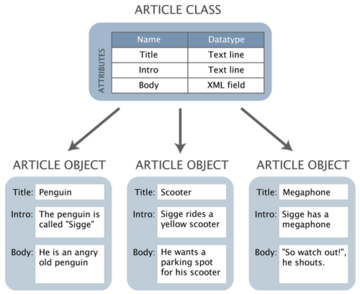
Publishing content is no longer only about publishing articles. Depending on your needs you must define specific content structures for cars, recipes, specific products for your webshop and more. Exponential has a flexible content engine that enables administrators to create these content definitions directly through graphical user interfaces.
Content cross publishing
graphics1
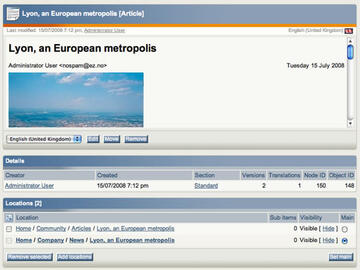
Using the cross publishing feature, you can re-use content throughout the site while avoiding inconsistent duplicates of content that are hard to maintain. If content appears at multiple locations, you only have to edit the object once – the changes will be reflected at all locations.
Multi-site deployment
graphics1
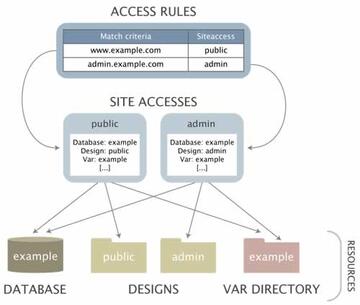
One installation of Exponential can host many different websites with the possibility to re-use content, functionality and design across the different sites. You can have a continuous overview of all your sites and can even industrialize this deployment via the Site Factory management service in Exponential Premium subscription services.
URL management and search engine optimization

graphics1
Exponential makes it easy for you to create content that will be effectively indexed by search engines. Sitemaps, friendly URLs, and easy management of key XHTML tags are all built-in features.

